
How to Find Your Bike
Before you start searching for your bike…
Report the incident to the police.
Bike thieves are criminals. Please note that you should not, and are not encouraged taking any risks. Keep a safe distance, and make contact with the correct channels if needed. Contact the police for further, physical assistance.
BikeFinder support is available for guidance on how-to locate your bike within opening hours.
Contact details
Contact BikeFinder Support by email at [email protected] or submit a ticket through bikefinder.freshdesk.com.
Response estimate
You may expect a 24–48 hour response time. We aim to get back to you as soon as possible. During busy periods, response times may vary. You can follow your ticket through bikefinder.freshdesk.com.
Searching for your bike…
1. Report the theft to BikeFinder via the application. Select “Report theft“.

We will follow up by email. Please include your BikeFinder ID and the latest tracker information in your support request.
2. Activate Tracking Mode on the device to get more position updates, if you already do not have active signals.
Do not have this mode active for more than 30-40 minutes, as this mode will drain your tracker’s battery. This mode is only for 1) triggering new, active signals, and 2) testing/troubleshooting purposes.
Tracking mode will continiously work to attempt receiving new signals. This is it’s main purpose.
➣ Modes and signals
3. Navigate to ”History” in the app to view and track all incoming positions.
Open the BikeFinder application ➣ Select your tracker ➣ Select ”History”
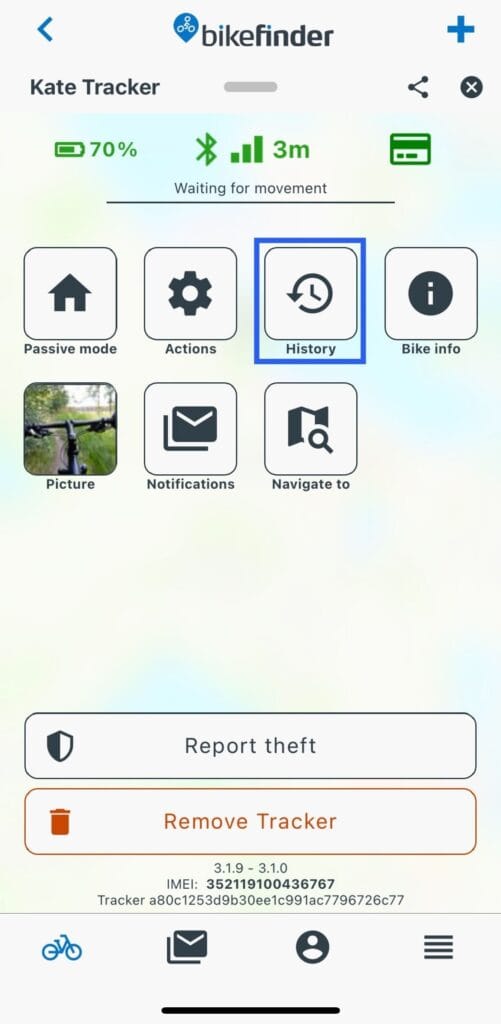
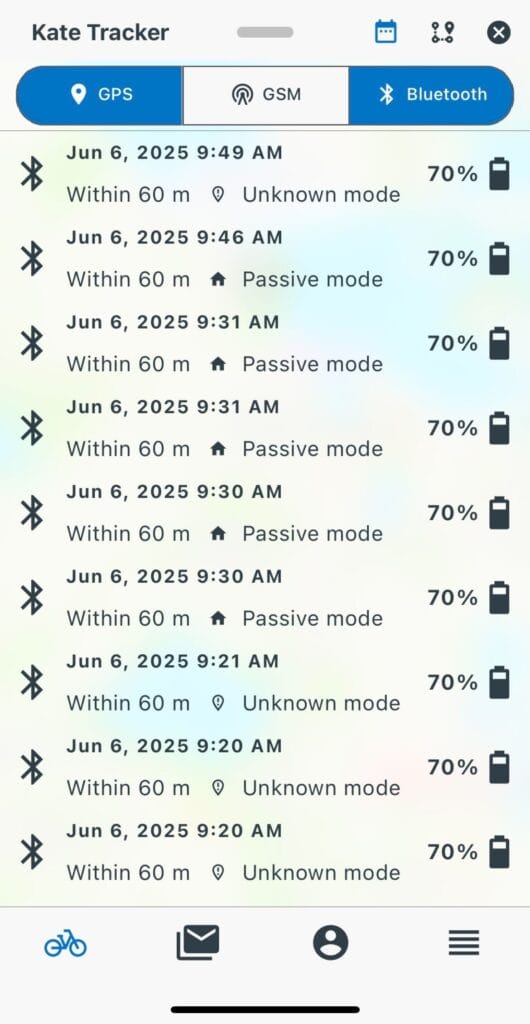
4. Have the application open while you are searching for the bike. Ensure that you have Bluetooth enabled in your phone’s settings.
5. If you are receiving new GPS positions in the BikeFinder application, you can start tracking your bike.
It is important to verify date and timestamp so that you do not chase after old data, which will be of no use.
6. Turn on Bluetooth in your phone’s settings. If your bike is near your phone/application, BLE will automatically connect and show the distance in meters; within 60 meters from the bike.

• GPS positions are accurate – typically within 5-10 meters
• Wi-Fi positions can be as accurate as 5-50 meters
• GSM (G1 tracker) and LPWAN (Gen2 tracker) positions are less precise and gives a broad location (range can be within 2500 meters).
• Bluetooth is very precise and it’s range is about 60 meters, depending on conditions
This means that starting from a GSM or LPWAN position, you might have to move around a bit to get the Bluetooth within range. Therefore it will be much easier finding your bike when you have active GPS signals.
Did you only get inaccurate GSM or LPWAN signals, or no signals at all?
1. Activate security mode on your tracker to save battery.
2. Wait until you get a notification from when there is movement. Understand how the movement sensor works here.
3. Look for new, active GPS signals.
4. If you have new, live GPS signals, try searching for your bike again using Bluetooth after arriving the latest GPS destination.
When will your case be forwarded?
BikeFinder Support [email protected] bikefinder.freshdesk.com
Suggestions on how to improve this article?
Please submit a ticket below